
Scope it in one sentence first
Before any code, write down what you should hear. For a delay, that sentence is: “When I play a short note, I should hear it repeat, each repeat quieter and a little darker, and Time should change how far apart the repeats are.” Then fence it in:
| Version 1 will | Version 1 won’t |
|---|---|
| Time 50–1500 ms, Feedback 0–90 %, Tone 500 Hz–12 kHz, Mix 0–100 % | Tempo sync, ping-pong stereo, modulation, saturation |
| Glide when Time moves, like tape, never click | Feedback at or above 100 % (self-oscillation) |
| Always die away, whatever the knobs say | Build a native plugin (that comes later) |
The won’t list matters as much as the will list. Without it, the AI tends to add stereo and tempo sync in the first prompt, and you can no longer tell which part is broken. More on this in scope your first plugin.
How the signal flows
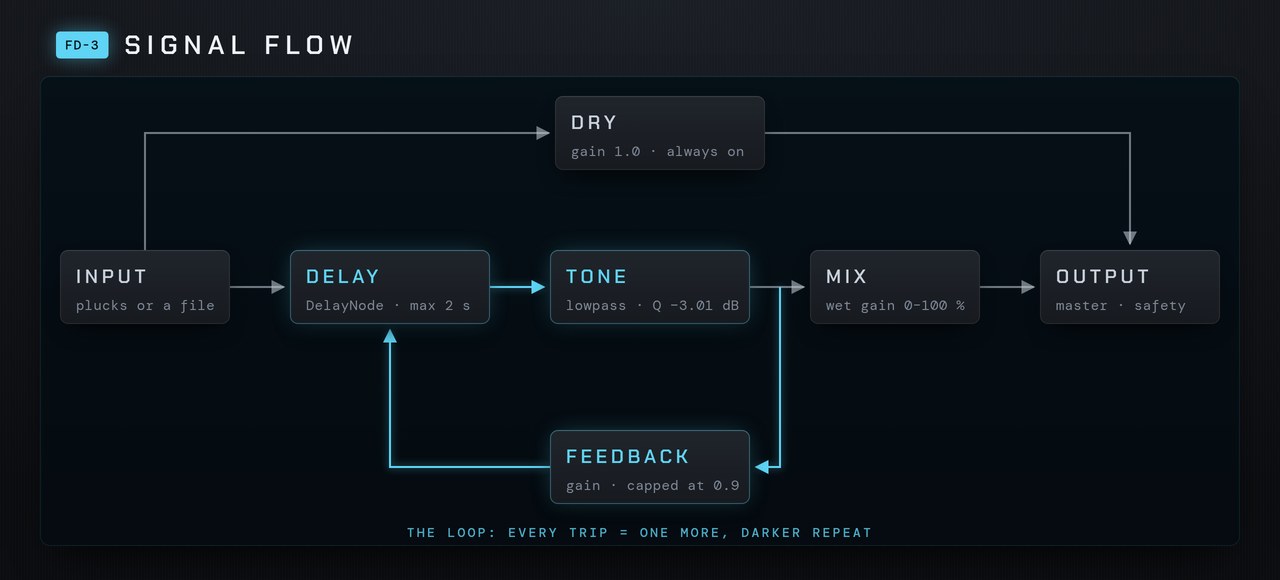
Two Web Audio facts shape the code. First, the graph only allows a loop if it passes through a DelayNode, so the feedback gain has to connect back into the delay itself. Second, the tone filter sits inside the loop, between the delay and both the wet gain and the feedback gain. That placement is what makes repeat three darker than repeat two, the way a tape echo sounds.
Three prompts, one step each
Use a fresh chat for each prompt and listen before moving on. Each one ends with a check you can hear.
Prompt 1, one echo: “Play short plucked triangle notes, one every 1.5 seconds, with a 5 ms attack and a 0.25 s decay. Write createEffect(ctx) returning { input, output, set(name, value) }: input to a dry gain fixed at 1, and input to a DelayNode (max 2 s) to a wet gain. Time 50–1500 ms, default 375. Mix 0–100 % sets the wet gain. Smooth every change with setTargetAtTime, 0.02 s.”
Check: each pluck is followed by exactly one copy, and Mix at 0 removes it.
Prompt 2, feedback: “Add a feedback gain from the delay’s output back into its input, 0–90 %, default 45 %. Clamp it to 0.9 inside set() as well as on the control, so no value can make the loop grow.”
Check: several repeats, each quieter. At 90 % the trail is long but still dies away.
Prompt 3, tone and glide: “Put a lowpass BiquadFilter between the delay and both the wet gain and the feedback gain. Tone 500–12000 Hz, default 4000. Set its Q to −3.01 so it has no resonant peak. Make Time glide with a 0.08 s time constant so moving it bends pitch instead of clicking.”
Check: turning Tone down makes each repeat darker than the last, and sweeping Time sounds like tape, not a click.
Fix 1: the echoes get louder instead of fading
This is the bug that catches almost everyone, and it’s why prompt 3 sets the Q. You cap feedback at 0.9, you add a lowpass to darken the repeats, and the trail swells into a howl anyway. The cap was fine. The filter is the problem.
In Web Audio, a lowpass filter’s Q is measured in decibels, and its default is 1 dB, not the flat setting. At 1 dB the filter has a small resonant bump: a gain of about 1.25 near 3 kHz when the cutoff is 4 kHz. Inside a loop, that bump multiplies with the feedback, so 0.9 × 1.25 gives a loop gain of 1.13 at that frequency. Anything above 1 grows on every trip round.
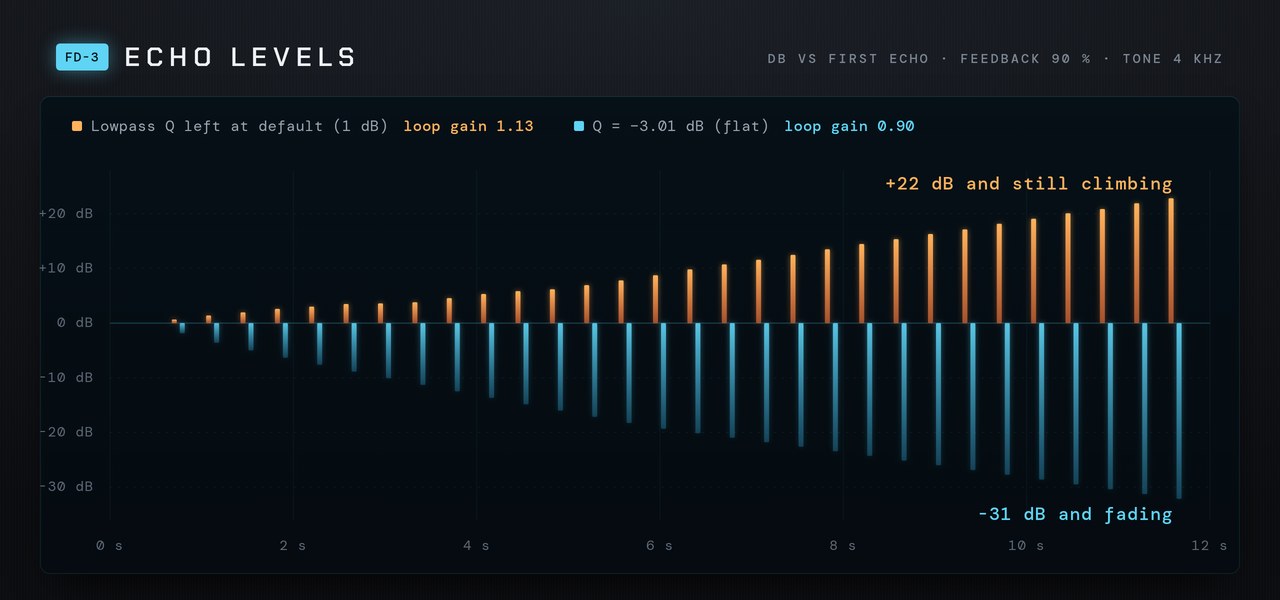
The fix is one line. A Q of −3.01 dB is the flat (Butterworth) setting, with no bump, so the loop gain can never exceed the feedback value:
const tone = ctx.createBiquadFilter();
tone.type = 'lowpass';
tone.frequency.value = 4000;
tone.Q.value = -3.01;   // flat: no resonant peak inside the loop

function setFeedback(v) {
  feedback.gain.setTargetAtTime(Math.min(v, 0.9), ctx.currentTime, 0.02);
}
If you want a resonant filter in the loop for character, cap the feedback lower to compensate. With the default Q, anything above about 0.8 can grow.
Fix 2: repeats drift late
The first echo lands on time, but later ones arrive a few milliseconds late, and the gap grows with each repeat. Web Audio processes audio in blocks of 128 samples, and in Chrome a loop in the graph adds one block to every trip round. At 48 kHz that’s 2.7 ms per repeat. You can’t hear it on one echo, but it smears rhythmic delays and throws off tempo sync later.
The fix is to delay the input by the same 128 samples on the way in and shorten the loop delay by the same amount, so every repeat lands exactly one Time apart:
const QUANTUM = 128 / ctx.sampleRate;          // one render block
const pre = ctx.createDelay(0.01);
pre.delayTime.value = QUANTUM;

input.connect(pre).connect(delay);
delay.delayTime.value = 0.375 - QUANTUM;       // 375 ms between repeats

// in set('time', ms):
delay.delayTime.setTargetAtTime(ms / 1000 - QUANTUM, ctx.currentTime, 0.08);
Prompt that finds it: “My test says echo 1 is at 375 ms but echo 2 is at 752.7 ms and echo 3 at 1130.3 ms. Each trip round the loop adds 2.7 ms. Is the loop adding one 128-sample render quantum? Fix it so every echo is exactly Time apart. Change only the delay code.”
Test it without listening for an hour
Ears are the final judge, but they’re slow at catching a 3 ms drift or a loop that grows by less than 1 dB per repeat. An OfflineAudioContext renders the effect faster than real time, so a small test page can feed one click in and measure the result. Ask your assistant for checks that the echoes land within half a millisecond of Time, that each repeat is roughly feedback times the one before, and that feedback at 0.9 has died away after 12 seconds. Run the page after every prompt, and you’ll catch a regression the moment it happens.
Where to take it next
- Tempo sync. Convert BPM and note values to milliseconds. This only works well once Fix 2 is in.
- Ping-pong. Two delays with crossed feedback, each panned hard left or right.
- Wow and flutter. A slow, small LFO on
delayTimefor a tape character. - A native plugin. The loop, the cap and the flat filter all carry over to JUCE. See from browser prototype to VST/AU.
If something else breaks along the way, such as silence, clicks or zipper noise, the troubleshooting guide covers the usual causes.
Keep going
- Learn hub, the full path map
- Scope your first plugin
- When your vibe-coded plugin breaks
- A JUCE learning path
Related on the blog: Web Audio API for musicians · Prompt chain for audio plugins · Common mistakes